
How it works
Real equations, not pictures
Word stores an equation as Office Math (OMML): a structure of fractions, radicals, scripts, matrices and so on, the same thing Word's own equation editor builds. TeXConverter reads your LaTeX and builds that structure directly, so what lands in your document is indistinguishable from an equation made by hand in Word. You can click into it, edit it with Word's tools, change its font size, and it re-flows with your text.
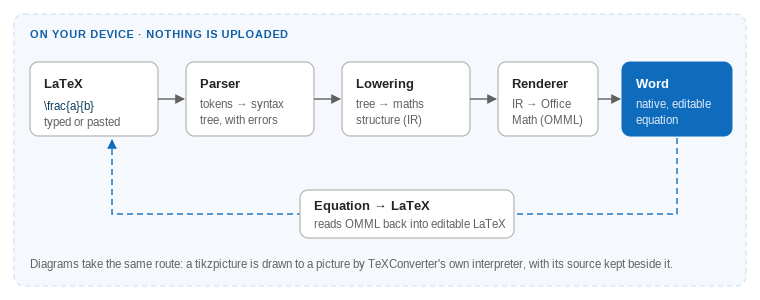
- Parser. The LaTeX is split into tokens and parsed into a tree that mirrors LaTeX's own
structure:
\frac,\sqrt, environments, accents. A mistake stops here with a message saying what is wrong and where, and often how to fix it. Nothing is guessed. - Lowering. The tree is turned into a smaller set of mathematical building blocks, closer
to what Word understands. Decisions like "
\lim_{x\to0}puts the limit underneath" are made here. - Renderer. The building blocks are written out as Office Math, and Word inserts it.
- And back. Equation → LaTeX reads Office Math, including equations made in Word's own editor, back into LaTeX you can edit.
Diagrams
A tikzpicture (a pgfplots graph or a TikZ drawing) is drawn by TeXConverter's own
interpreter, not by TeX, and inserted as a picture. The picture keeps its source in its title,
so it can be edited again and saved back out as the tikzpicture it was.
Converted on your device, kept on your account
Every conversion — equations, documents, diagrams — runs inside Word, the desktop app or the command line on your own computer. A document is never sent to a server.
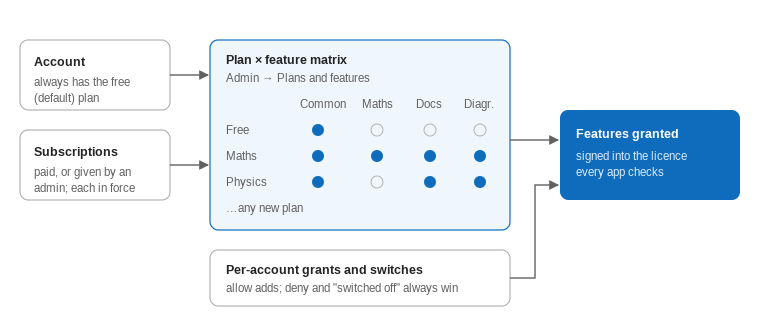
The TeXConverter server knows your account: your email address, which plan you are on, and which devices are signed in. The apps check your plan with a signed licence they verify themselves, which is also why they keep working offline.
While you're signed in, the account also keeps Your work: each equation, graph, table and diagram you insert in Word, or save or copy on the website or in the desktop app, plus your Recent symbols, the last diagram, graph and table you were working on, and your settings. Open Word hours after working on the website and it's all there. A change made in one app reaches the others within seconds. Delete something from Your work and it's gone everywhere. Signed out, nothing is kept, and the website's Try page connects to nothing at all.
What is supported
Supported LaTeX is the exact list: every construct that converts, the ones that convert with a known difference, and the ones that are refused with a clear message rather than turned into a wrong equation.