Handwriting, photos and PDFs · Word add-in · Desktop app

Maths on paper.
Editable LaTeX and Word.

Turn handwritten notes, photos and PDFs into LaTeX or Word with real equations you can click into and edit, never pictures. Convert Word and LaTeX files both ways, check every page beside the original, and type LaTeX straight into Word with the add-in.

  • No account needed to try
  • Upload from your phone
  • Free plan, no card
Works with Word for Windows Word for Mac Word on the web Microsoft 365, Word 2019+ .tex and .docx files

Features

Everything you write maths with, inside Word

One side pane for equations, documents and diagrams, built for people who think in LaTeX but hand in Word.

PDFs and photos

Bring handwritten and scanned equations into Word

Choose PDF to LaTeX, PDF to Word, Photo to LaTeX or Photo to Word inside Convert files. Compare the original page with the recognized maths, edit the LaTeX, then save the reviewed result.

  • Review the source beside the converted result
  • Edit the recognized LaTeX before exporting
  • Save as a Word document or standalone LaTeX

Open PDF and photo conversion

Convert files
  • Word and LaTeX
  • PDF to LaTeX · PDF to Word
  • Photo to LaTeX · Photo to Word
Review and edit before savingOpen
LaTeX → Word

Equations Word treats as its own

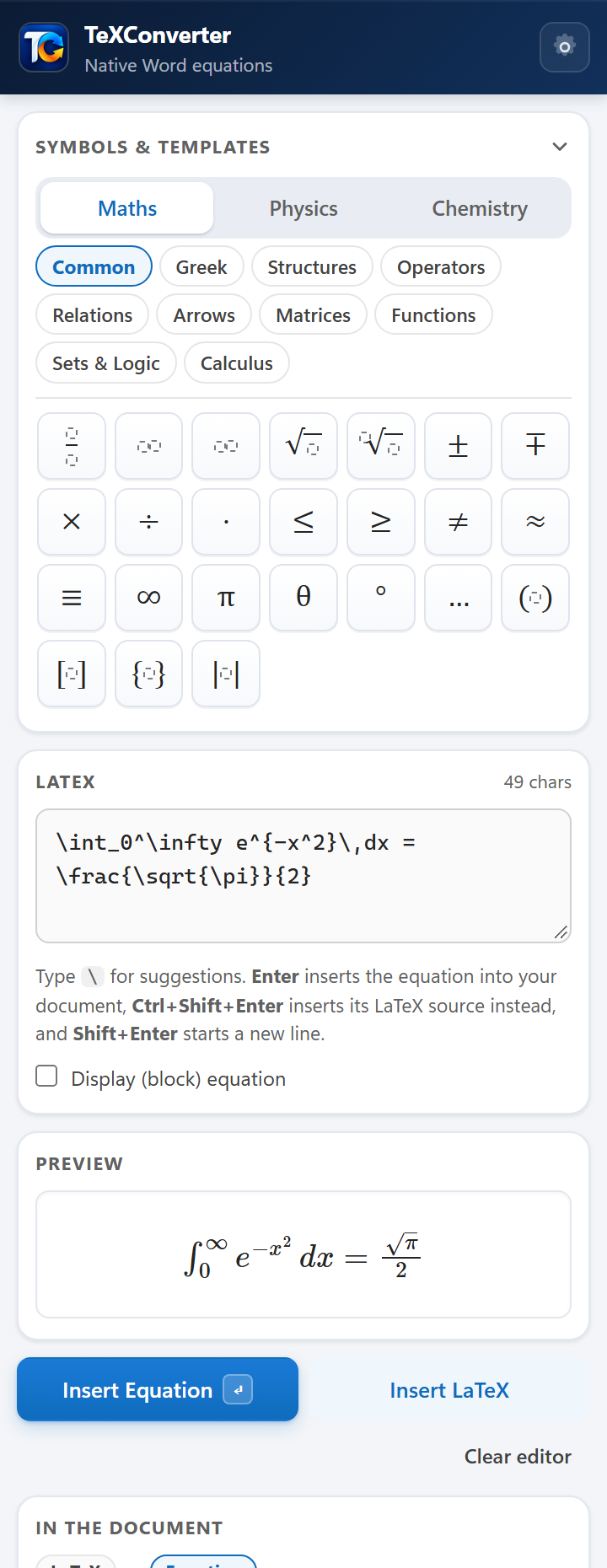
Fractions, roots, matrices, integrals, limits, cases and accents become real Office Math, the same structure Word's equation editor builds. Click in and edit, resize the font, change the style: nothing is a picture.

  • Live preview as you type
  • Suggestions for every \command
  • Clear messages for what it can't convert, never a guess
LaTeX
\sum_{n=1}^{\infty} \frac{1}{n^2} = \frac{\pi^2}{6}

Native Word equation

Whole documents

Convert a whole paper in one go

Paste a document full of $…$ and \[…\], see every equation it found, and convert them all after a preview. Open a .tex file as a Word document, or save your document as .tex.

  • Preview before anything changes
  • Problems listed, the rest converted
Convert document
  • $x(\frac{dy}{dx})^2 - x + a = 0$
  • $\frac{d^2y}{dx^2} + xy = 0$
  • $dy + dx = 0$
  • \[ \int_a^b f(x)\,dx \]
4 equations readyConvert all

Made for

Whoever writes the maths

Students

Write assignments and theses in Word at LaTeX speed, and hand in documents your teachers can open and edit.

Teachers and institutes

Turn question banks written in LaTeX into clean Word papers, with every equation editable, in minutes rather than evenings. Licences for your staff →

Researchers

Move papers between Overleaf and co-authors who use Word without retyping a single equation.

Get started

Up and running in two minutes

  1. DownloadGet the add-in for your Word and run the installer. No admin rights needed.
  2. Sign inOpen TeXConverter from the Home tab and sign in with an email code or Google. It's free.
  3. Type LaTeXPress Enter, and the equation is in your document, ready to edit.

Plans

Start free. Pay when you need more.

Every account starts free. See the plans and prices

Paid through Razorpay. Yearly plans cost less. Need more AI? Buy credits ten at a time. Cancel any time from your account; you keep your plan until the end of the period you paid for.

FAQ

Questions, answered

Are the equations pictures?

No. Every equation is a native Word equation (Office Math), exactly what Word's own equation editor makes. You can click into it, edit it, and change its font size like any other text.

Do my documents get uploaded anywhere?

Word, LaTeX and MathML files are converted on your own device and never uploaded. Photos and scanned PDF pages are sent only to be read, and the result comes straight back; see Privacy. Signed in, your account keeps what you insert and save in Your work, with your Recent symbols and settings, so they're on the website and in the desktop app too; delete any of it and it's gone everywhere.

Which versions of Word does it work with?

Word in Microsoft 365 and Word 2019 or later on Windows and Mac, and Word on the web. See Download for each.

What LaTeX does it understand?

The maths people actually write: fractions, roots, sums and integrals, matrices and arrays, cases, accents, operators, Greek, arrows, and much more, plus pgfplots and TikZ for diagrams. The full list is in Supported LaTeX.

Can I use it on more than one computer?

Yes. Each plan covers a set number of devices; the Plans section above lists them. You can remove an old device from your account page at any time.

How many pages can I convert?

You can try it without an account. Each plan reads a set number of pages a month, from photos and PDFs; the Plans page lists them. AI credits are separate, and you can buy more at any time.

Can I share a plan with my team?

Yes. Business can be shared with more people by email from your account page, for as long as your subscription lasts.

How do I cancel?

From your account page, in one click. You keep your plan until the end of the period you paid for, then move back to Free.

More questions →

Turn your next page into LaTeX or Word

Free to try, no account needed. Or add TeXConverter to the Word you already have.